procedural-to-declarative







📘Documentation: https://34j.github.io/procedural-to-declarative/
📦️NPM Package: https://www.npmjs.com/package/procedural-to-declarative
Compile procedural state transitions (do, wait, set, wait, ...) into declarative time-to-state functions (t -> do, set).
Installation
npm install procedural-to-declarative
Motivation
Video generation using TypeScript is a hot topic. Typically such package requires a function that maps time to state of HTML / React elements, etc.
type DeclarativeFunction<T> = (time: number) => T
However, it's often more intuitive to write state transitions in a procedural way:
const x = useRef(0)
function proc() {
sleep(1)
x.current += 1
sleep(1)
x.current += 1
}
Unfortunately, once trying to parallelize procedural functions, it turns out to be impossible, since the passed function cannot be "blocked" to sort the procedure (inner lines).
function proc() {
const x = useRef(0)
all([
(() => {
sleep(1)
x.current += 1 // 00:01 (Unable to "block" here!)
sleep(2)
x.current += 2 // 00:03
})(),
(() => {
sleep(2)
x.current *= 2 // 00:02
})(),
])
}
By using async/await or yield (like motion-canvas did), the function can be "blocked" and the procedure can be sorted.
async function proc() {
const x = useRef(0)
await all([
(() => {
await sleep(1) // (1)
x.current += 1 // 00:01
await sleep(2) // Blocked until (2) is executed
x.current += 2 // 00:03
})(),
(() => {
await sleep(2) // Blocked until (1) is executed (2)
x.current *= 2 // 00:02
})(),
])
}
function* proc() {
const x = useRef(0)
yield* all([
(() => {
yield sleep(1) // (1)
x.current += 1 // 00:01
yield sleep(2) // Blocked until (2) is executed
x.current += 2 // 00:03
})(),
(() => {
yield sleep(2) // Blocked until (1) is executed (2)
x.current *= 2 // 00:02
})(),
])
}
Our package uses the second approach.
Usage
Simple Usage
import { all, any, compile, createTrack, runDeclarative, runProcedural, sleep, useCompiled, useRef } from 'procedural-to-declarative'
const track = createTrack<number>()
const x = useRef(track, 0)
function* proc() {
yield sleep(1)
x.current = 1
yield runDeclarative(track, (time) => {
x.current = 1 + time
}, 1)
yield sleep(1)
x.current += 1
yield sleep(2)
}
runProcedural(track, proc())
const compiled = compile(track)
x history
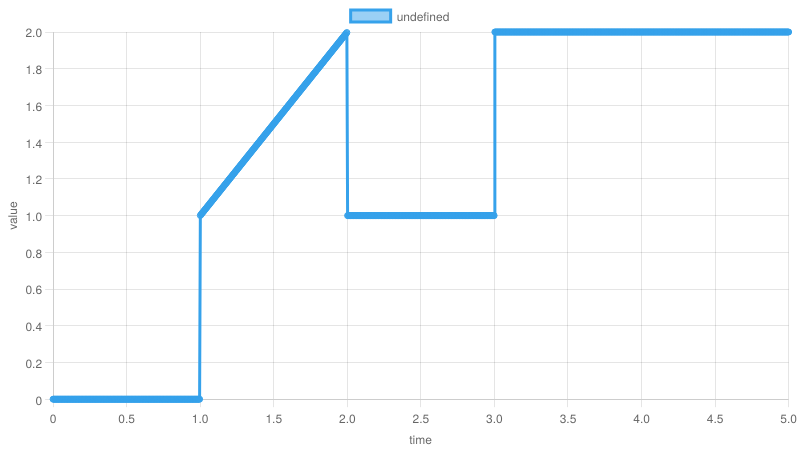
Description
Trackis the main data structure and tracks everything.Taskis the main concept of this package.Ref(useRef) registers a mutable reference to the track.- 2 type of functions exist:
- Procedural function (
IterableIterator<Task>):Refis read-write. - Declarative function (
(time: number) => void):Refis write-only.
- Procedural function (
compilecompiles the top-level procedural function into array ofTrackMaterialized, which is a fixedTrackat each time point.useCompiledconvertsTrackMaterializedinto a declarative function as a final output.Taskhas 4 types:TaskConstant: returned bysleep. ifyielded, it just blocks for the specified time.TaskProcedural: returned byrunProcedural. ifyielded, it blocks until the provided procedural function is completed.TaskDeclarative: returned byrunDeclarative. ifyielded, it blocks until the provided declarative function is completed.TaskAny: returned byany. ifyielded, it blocks until any of the provided tasks is completed.
Tasks can be suspended and resumed by settingisSuspendedproperty totrueandfalse.- If
TaskProceduralis suspended, all successorTasks invoked by the procedural function will also be suspended until theTaskProceduralis resumed.
- If
Advanced Usage
const track = createTrack<number>()
const x = useRef(track, 0)
const y = useRef(track, 0)
function* proc() {
const task1 = runDeclarative(track, (progress) => {
x.current = progress
}, 5)
function* task2Func() {
while (true) {
// Unfortunately this will not work as expected because declarative function is called later (x.current is always 0 here)
y.current += x.current
// This will work
y.current += 1
yield sleep(1)
}
}
const task2 = runProcedural(track, task2Func())
yield sleep(1)
task1.isSuspended = true
yield sleep(1)
task1.isSuspended = false
yield task1
yield sleep(1)
task2.isSuspended = true
yield sleep(2.5)
}
runProcedural(track, proc())
const compiled = compile(track)
x history
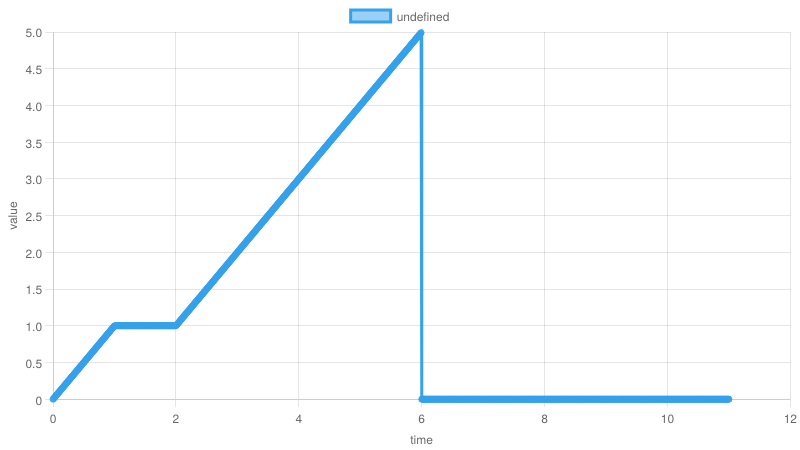
y history
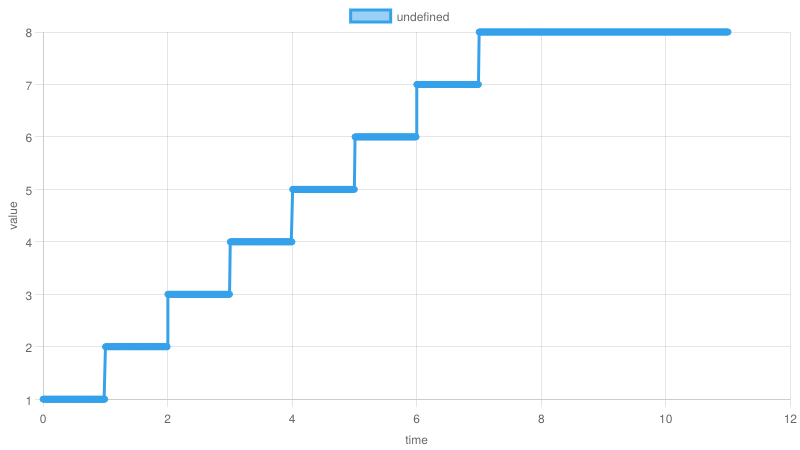
Comparison
- From our observation, none of the existing libraries support "waiting" while video / audio is playing.
- The comparison on the way of writing "animation" using static images is as follows:
Motion Canvas / Revideo
import { Circle, makeScene2D, } from '@revideo/2d'
import { all, createRef, makeProject, } from '@revideo/core'
/**
* The Revideo scene
*/
const scene = makeScene2D('scene', function* (view) {
const circle = createRef<Circle>()
view.add(
<Circle
ref={circle}
fill="lightseagreen"
/>
)
yield* all(
circle().width(0).width(100, 1),
circle().height(0).height(100, 2),
)
})
/**
* The final revideo project
*/
export default makeProject({
scenes: [scene],
settings: {
// Example settings:
shared: {
size: { x: 100, y: 100 },
},
},
})
https://github.com/user-attachments/assets/25d72e3b-c776-44c4-b28e-5ece22e5383e
FrameScript
import { useAnimation, useVariable } from '../src/lib/animation'
import { BEZIER_SMOOTH } from '../src/lib/animation/functions'
import { seconds } from '../src/lib/frame'
import { FillFrame } from '../src/lib/layout/fill-frame'
const x = useVariable(0)
const y = useVariable(0)
function scene() {
useAnimation(async (ctx) => {
await ctx.parallel([
ctx.move(x).to(100, seconds(1), BEZIER_SMOOTH),
ctx.move(y).to(100, seconds(2), BEZIER_SMOOTH)
])
})
return (
<FillFrame style={{ alignItems: 'center', justifyContent: 'center' }}>
<div
style={{
width: x.use(),
height: y.use(),
}}
/>
</FillFrame>
)
}